AR Unaddressed Deposit Payments Reflection on AR Aging Report
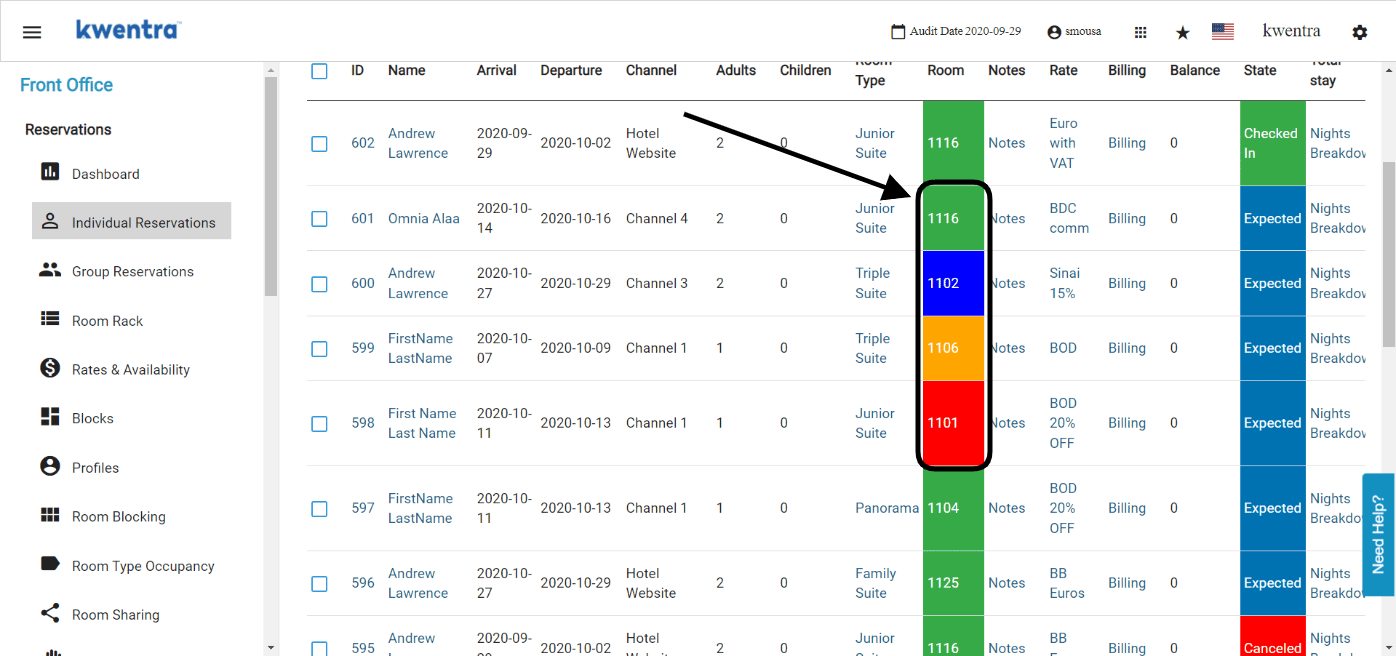
Report Update: Unaddressed deposits added to the AR account from the are now taken into consideration in the AR Aging Report.Cheque Value Date Update On Journal Vouchers And Reports
Feature Update: the cheque value date created from the pay to vendor option is now recorded on the journal voucher record and the vendor payments report.Income Statement Report Update
Report Update: you can now extract the income statement report for a specific account family I.E Rooms Division Family.You can also filter the income statement using the new account custom tags to view the balances of specific accounts only.Manual Receiving Screen Upgrade
Screen Upgrade: new fields are now available in the manual receiving screen to minimize manual effort and make it easier to create.Purchase Request Close Feature
New Feature: you can now close a partially ordered purchase request in order to differentiate between any finalized PR and the actual PR that are partially ordered.Read moreStock Usage Report Update
Report Update: you can now view the usages and consumption of items for specific departments I.E you can monitor the consumption of items from the housekeeping or front office departments.Read moreAlerts History On Reservations
Feature Update: the alerts on both individual and group reservations now shows you the history of change and completion of each alert on any reservation.Clone Group Reservations
New Feature: you can now clone group reservations regardless of their state to make reservations creation a lot easier.Search For Reservations With Specific Notes
New Search Field: you can now look up reservations from the individual reservations search screen using words written in notes.Grand Total in POS Invoices Update
Feature Update: the final invoice for any POS table is now in bold to make it more visible for guests and avoid any confusion.AR Payments New Feature
New Screen: a new screen has been developed to facilitate the process of tour operators payments and deposits and link them to specific invoices easily.Group Reservations Search Screen Updates
Fields Update: you can now search for the group booking’s state using the multiselect funcionality.Also changed the behavior of the dates field, you can now search using specific date ranges for arrival and departure.Front Office → Group Reservations → Search Screen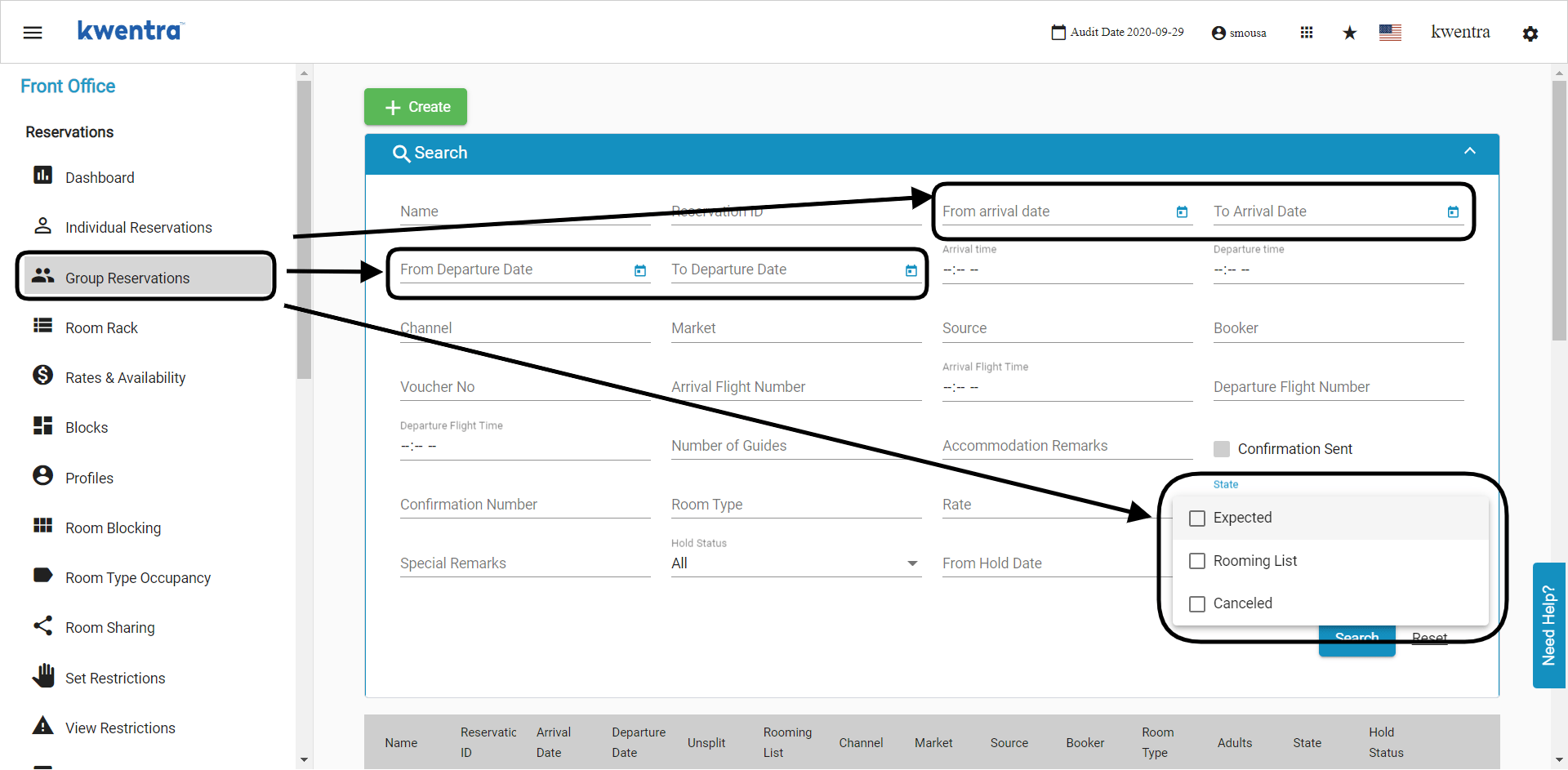
Guest Profiles Search Fields Update
Screen Update: kwentra guests profile Ids are now available on the profiles screen, you can also search with the old ID from your previous system.Read moreAdd New Fields To Vendors Profiles
New Fields: now you can include the vendor’s tax registration number and file number so that it would appear on vendor payments and printouts.Pay to Vendor Feature Upgrades
New Fields & Updates: the pay to vendor feature just got a major upgrade, this update includes the below points:- Vendor Profile Details now appear on the vendor payment screen.
- Cheque/Cash Automatic Serialization with the option to manually edit them.
- Cheque Value Date field for cheque payments.
- Receiving Orders and Return Requests data population on the vendor payment screen
- Option to print out the vendor payment invoice for documentation.
Vendor Payments Search Update
New Fields and Columns: you can now search with multiple parameters and have more columns on the screen for more information and faster operations.Read moreAssign Alerts To A Specific Division
New Feature: you can now add your departments and functions from front office settings to make alerts assignment more specific to certain teams.Open Balances Report Update
Report Update: the open balances report now shows the advance payments made on expected reservations separately under a new section called Deposit Ledger.Read moreReservations List Columns Update
Screen Update: you can now view the check-in, check-out times and voucher number from the list of reservations without the need to open the reservation itself.Group Reservations Alerts
Feature update: you can now leave a generic alert on a group reservation to apply on all reservations under it before split.Hide Rates with Close Out Restriction”stop sell\
Feature update: rate plans that has a close out restriction “stop sell” applied on it are noew hidden from the rate lookup grid while creating a new reservation.kwentra Dashboard Actual Arrival/Departure Update
Screen Update: we added two new operational cards to the dashboard to communicate the number of actual arrival/departure rooms you have for the day.Rate Change Report Update
Report update: the Rate Change Report now shows the multiple rate changes done by staff on any checked in reservation. Read MoreReservations List Report Update
Report update: you now can view the actual time of reservation creation and which user created it through the Reservation List Report.Read moreRoom Move Report Update
Report update: the Room Move Report now shows the multiple room number changes made by staff on any checked in reservation.Group Reservations’ Rooming List Import/Export Update
Feature Update: you can now export the group reservation’s rooming list with their overbooking status and allow overbooking occurrence and application in bulk using the import option.Room Rack New Vacant Rooms Filter
New Feature: using the new Vacant Rooms Filter on room rack, you now have the ability to focus on the vacant rooms only to assign and create new reservations on them.Read moreAdd Window Instructions Update
Feature Update: the Add Window button is now available directly from the billing screen.Read moreNew statistic type flag for room revenue calculations
Feature Update: a new statistic type flag for room revenue that lets you see the correct revenue figures based on your need.Dine in / Take out filter on store sales invoices report
Report Update: your store sales invoices report now has the filter for dine-in and take-out invoices so that you can easily check the total for each service type.Read moreAccounts Receivable Deposit Payment Update
Feature Update: Deposit Payments to the travel agency’s accounts receivable account does not generate an invoice number and can be done directly from the open balance screen.Exclude Expected Reservations from Country Report
Report Update: you can now extract the country report excluding the expected reservations in order to get all the guests’ countries that have actually stayed or currently staying at your hotel.Reports → FO → CountryFront Office Automatic Room Assignment Update
Feature Update: a new logic for automatic room assignment that takes place on reservations created from Online Booking and Front Office.Guest In-house report print enhancement
Report Update: a new enhancement to the view of the guest in-house report to make it more print-friendly.Read morekwentra Insights Language Selection
Translation: a new language setting is available on kwentra insights app to allow you to view your data in the language you desire.Nationality Report Name Change
Report Update: we have changed the name of the Nationality Report to be called Country Report.Reports → FO → CountryClose Cashier Currency Update
Feature Update: you can now see the amounts received on a daily basis when closing your cashier in both foreign and base currency of the system.Group Reservation Rooming List
Feature Update: you can now import/export the group reservations rooming list including the arrival, departure dates and the room type to make it easier for reservations update.Read moreInvoices Quick Print Feature
New Feature: a special button is now available on billing screens to allow you to quickly print guests’ invoices and folios.Out of Service Rooms Color Code on Room Rack
New Feature: you can now easily identify which rooms that are out of service from your room rack.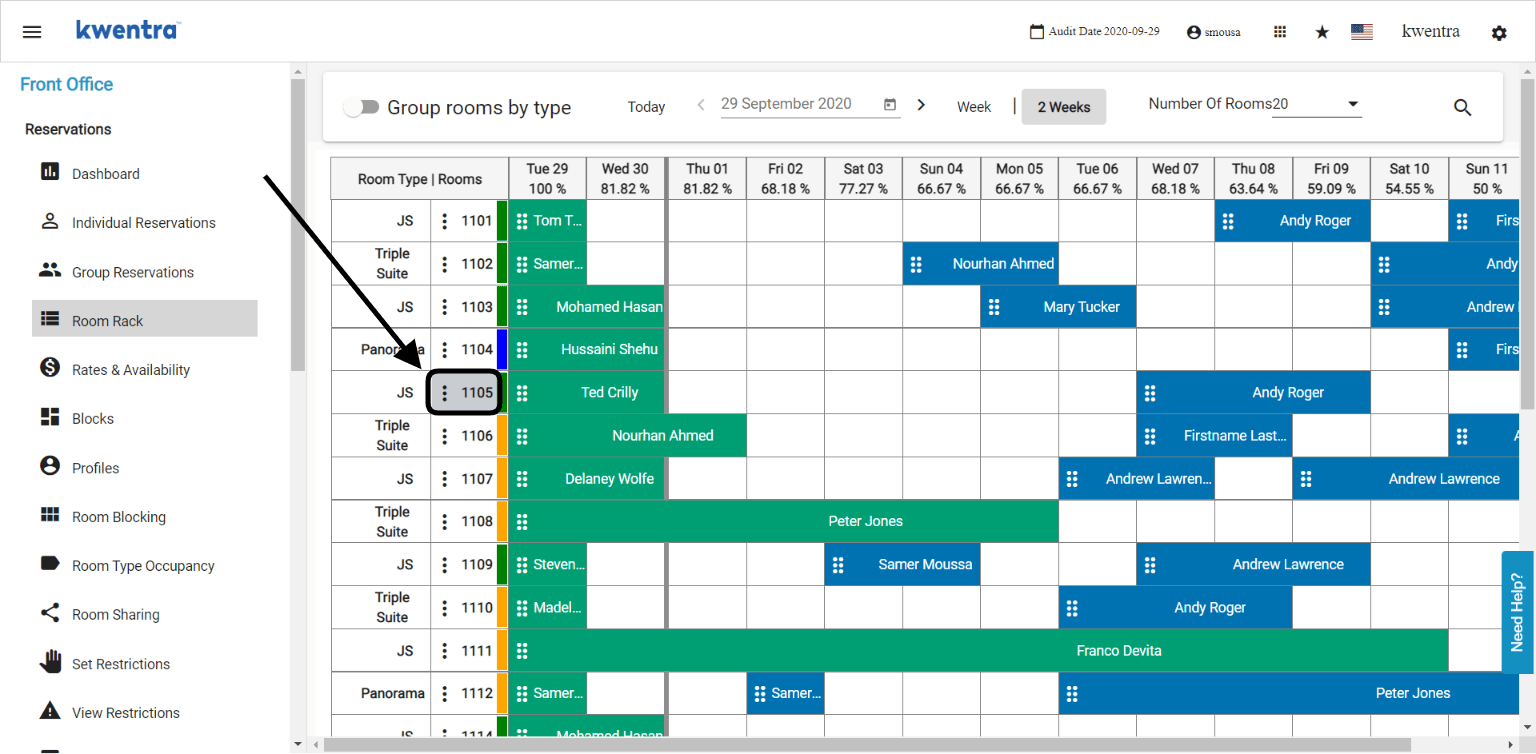
Profile Production Statistics Report
New Report: the new Profile Production Statistics Report is now available to provide insights regarding your channels’ performance and KPIs throughout the year.Read moreProforma Generation Includes Current and Future Charges
Feature Update: generating the proforma will now include the current charges that has been added to the guest’s bill alongwith the future charges that will be added automatically with every night turn.Revenue & Occupancy Statistics Report Update
Report Update: We have updated the revenue and occupancy statistics report to include more columns for revenue and occupancy percentages.Read moreSearch for a reservation using other guests profiles
Feature Update: you can now search for reservations using the secondary “other” guests’ profiles and it will pull up the reservation they are added to.Accounts Receivable Deposit New Feature
New Feature: Adding deposit entries on tour operators’ reservations is easily done with the new AR Deposit Feature.Read moreClone Reservations Feature Update
Feature Update: Clone Reservation is now available on all reservation states and not just expected reservations.Egyptian Tourism Police Report
New Integration: uploading your guests information onto the Egyptian Tourism Police Portal is now an automated process.Please Contact support@kwentra.com to activate this integration or directly get in touch with you support accounts manager.Read moreNew Alerts Listing Screen
New Screen: the Alerts Screen is now available for you to track and view all alerts added on all reservations at once.Reservations’ Alerts New Update
Feature Update: Adding and viewing alerts on reservations is now easier from the reservations list rather than going inside every reservation to apply/view them.Revenue Sub-Departments Feature Update
Feature Update: Revenue Sub-Departments are now available to be added either in amounts or percentages to allow fixed division to the revenue inputs.Room Number Search Lookup Update
Feature Update: now you can search for multiple room numbers from the reservation list screen.Front Office → Individual Reservations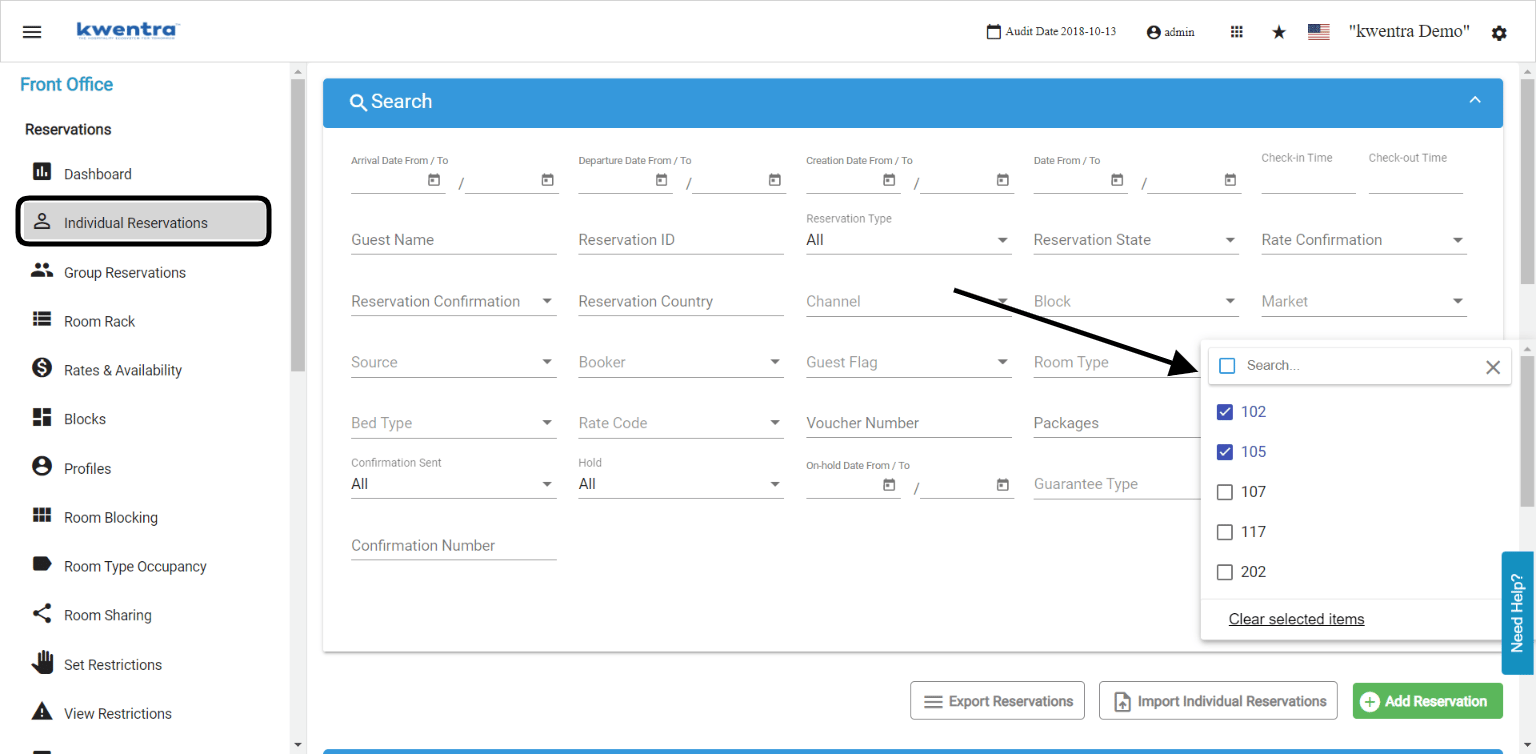
Room Selection and Assignment Update
Feature Update: When changing a room number or selecting a room number from scratch, the room type reflects automatically without selecting the room type first to save you time.Housekeeping Discrepancy Feature and its report
New Feature: Housekeeping discrepancy to compare the expected and actual state of the rooms alongwith the number of guests occupying each room for more control.Read moreMove Charges to a PayMaster
New Feature: create and transfer charges from the reservation directly to a new paymaster with minimum steps and effort.New Reservation Confirmation Flag
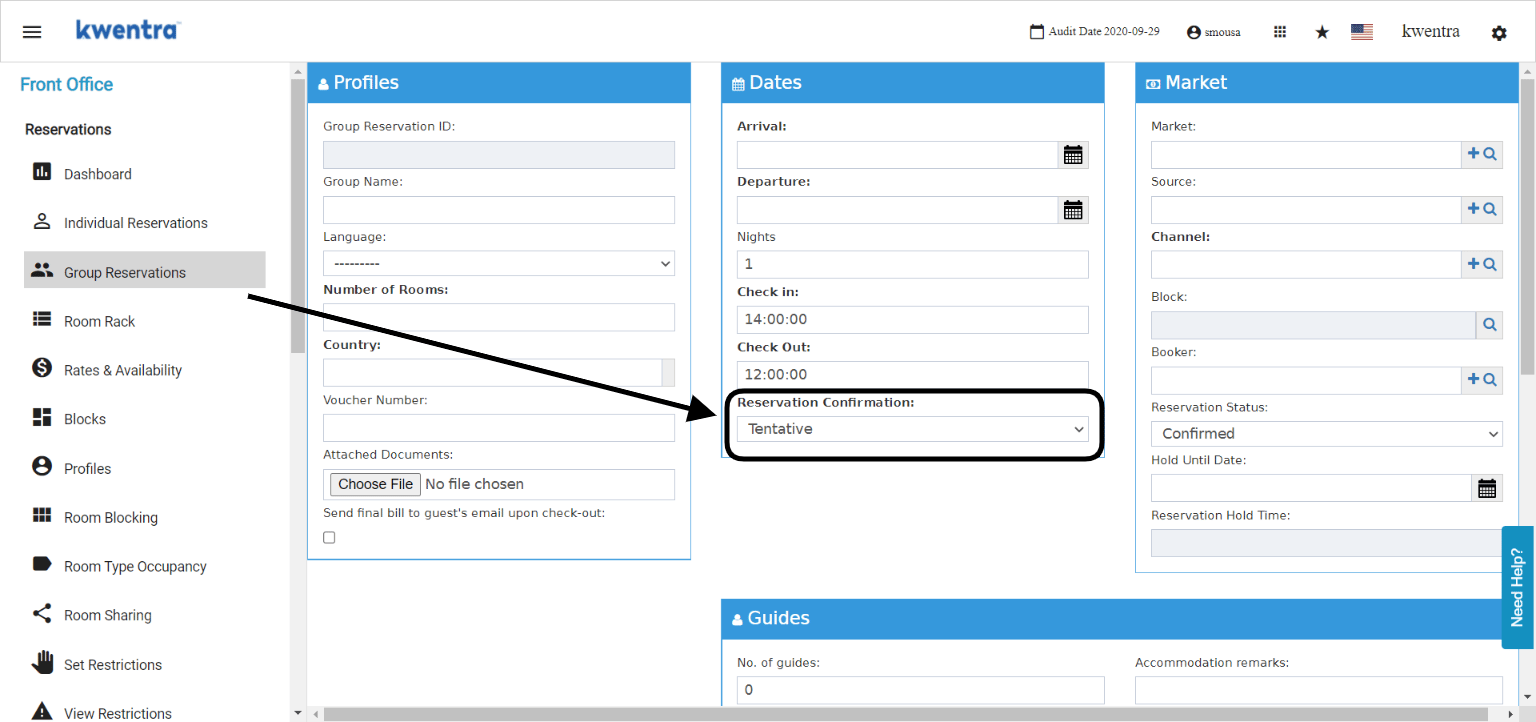
New Field: when adding a single or a group reservation you can use the new Reservation Confirmation Field to differentiate between confirmed reservations and reservations that are yet to be confirmed.This field affects the below reports so that you can easily include/exclude tentative reservations from your calculations.Revenue and Occupancy Statistics.Channel Revenue Report.Market SegmentOccupancy by room typeIndividual Reservations:Front Office → Individual Reservations → Add Reservation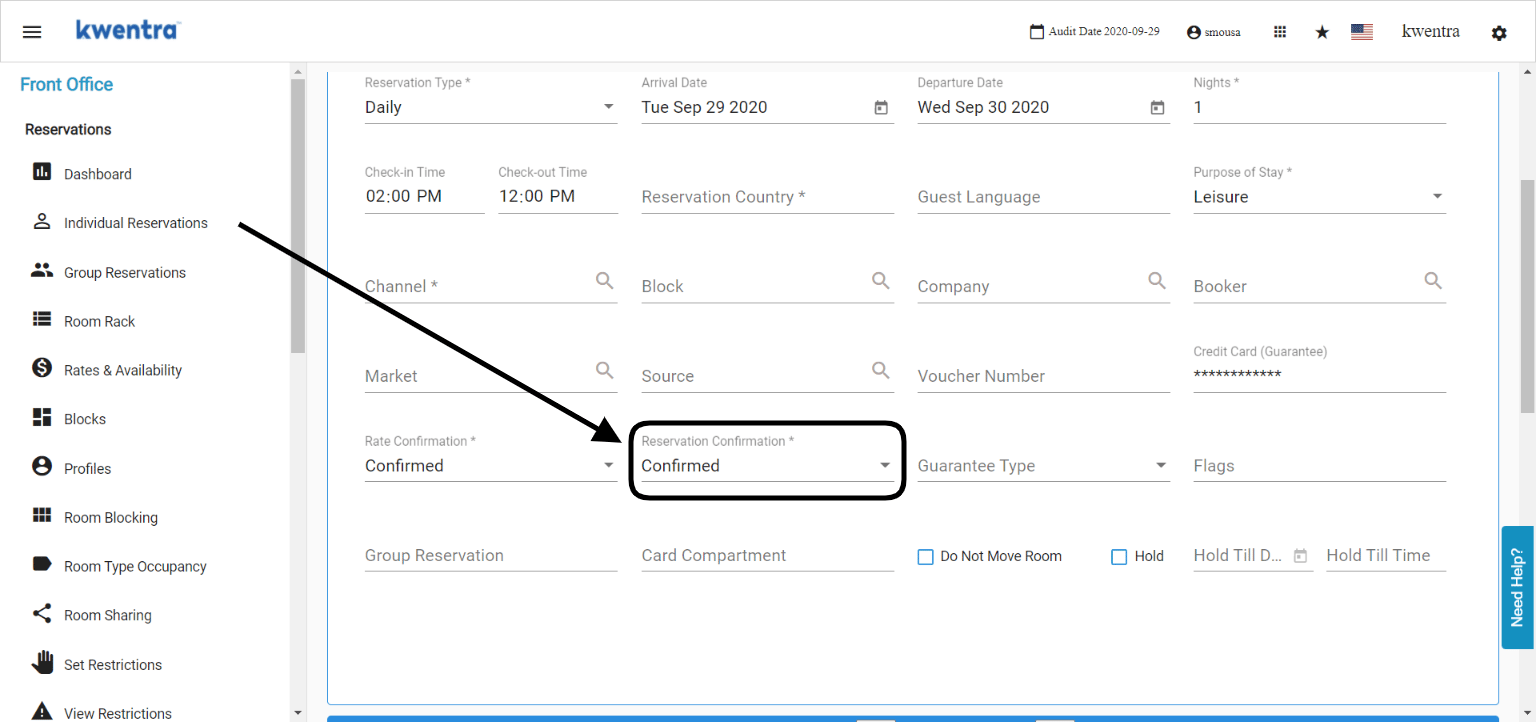
Revenue and Occupancy Statistics Default Search Parameters
Once you reach this report, the search parameters will be filled by default with the below inputs. All you need to do is download or preview the report:- From Date: report start date will always be your current system date.
- To Date: will be 2 weeks into the future from today’s date.
- Columns will be defaulted to be simplified without the channels.
- Complimentary & House Use rooms will be shown by default.
- Reservation Confirmation will be defaulted to the confirmed reservations only.
Add Booker field to the reservations list search form
New Field: you can now search for the reservations created under a certain booker from individual reservations.Add multiple reservations to an individual reservation
New Feature: whether it is a family or a group of friends, creating multiple individual reservations at once is very easy with the new Add Reservation Feature.Read moreBulk Charges & Cashiering Search Update
New Search Fields: you can now search for multiple reservations and channels from the Cashiering Screen to easily manage different reservations at once.Front Office → Bulk charges / Cashiering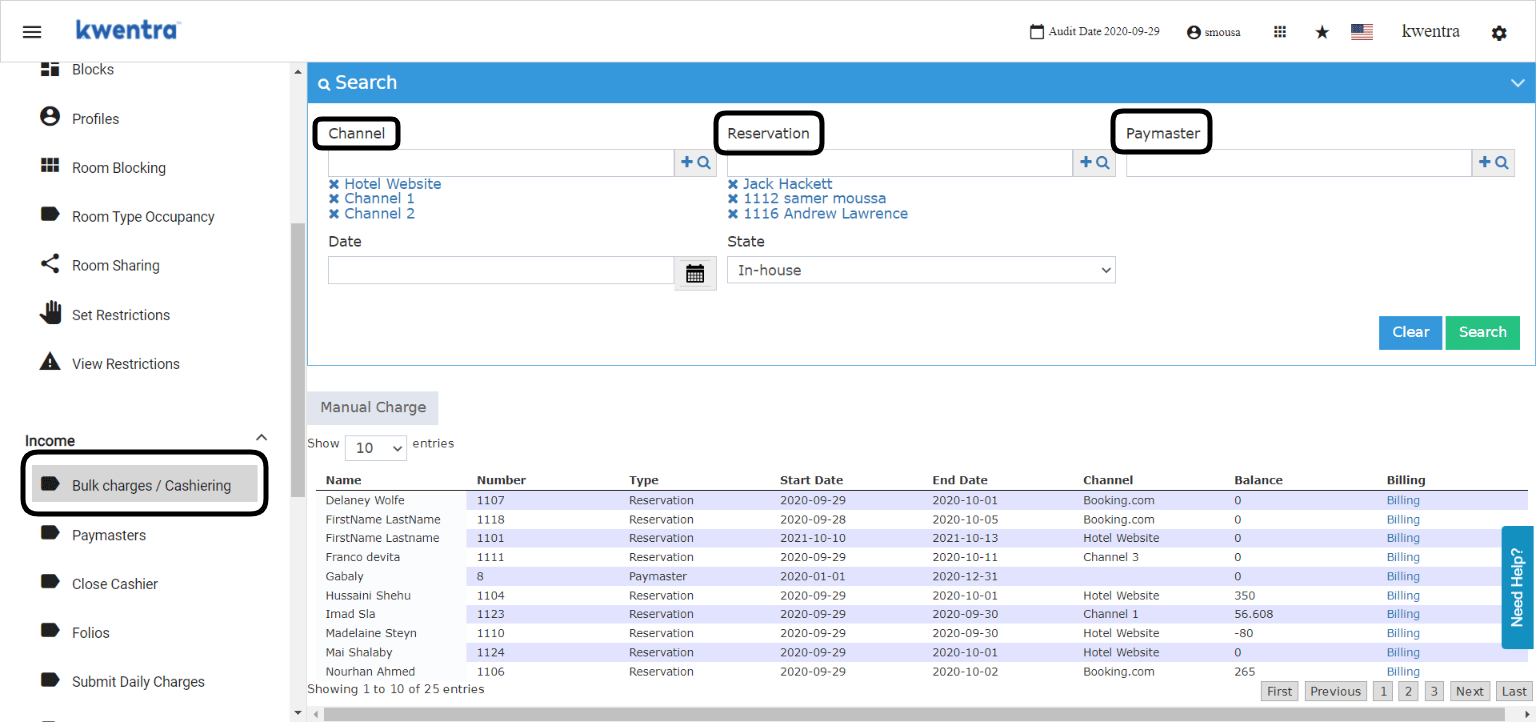
Bulk Charging Instructions New Update
Feature Update: adding multiple departments whilst creating a bulk charging instruction on multiple reservations.Know your room’s features from room rack
New Feature: knowing your room features is very simple from kwentra room rack.Read moreNew Alerts Feature
New Feature: you can now leave vital alerts on your reservations that pop up automatically for other staff members to read and act on them accordingly.Post Daily Charges From Billing Screen
New Feature: posting the daily charges on a single reservation is very easy to apply from the reservation’s billing screen.Front Office → Individual Reservations → Select a Reservation → Billing → Post Daily Charges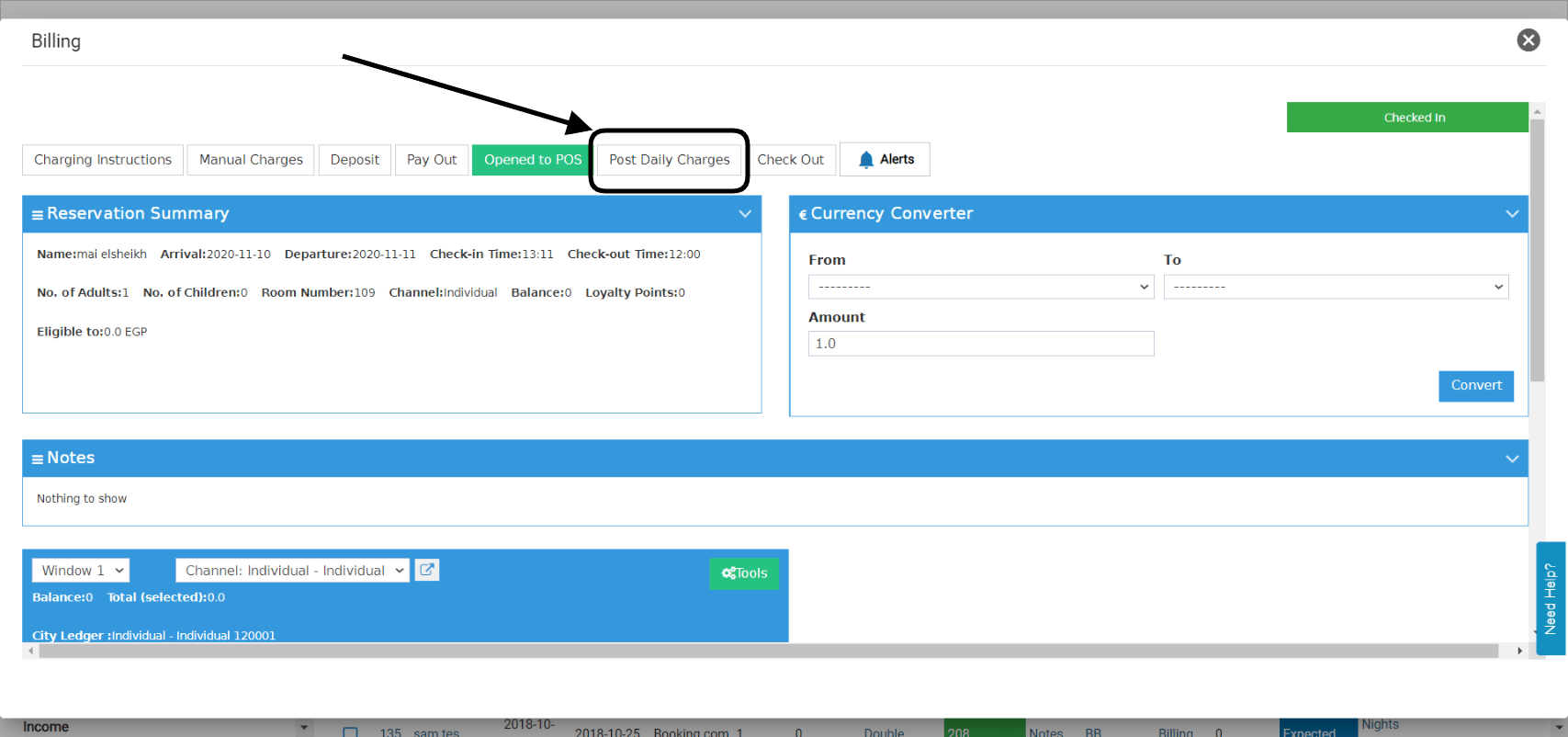
Proforma Behavior Update
Feature Update: what we used to know as Receipt is now called a Proforma with a few updates o its behavior.Reports Preview
New Feature: all of kwentra reports can be viewed on screen without the need to download them every time.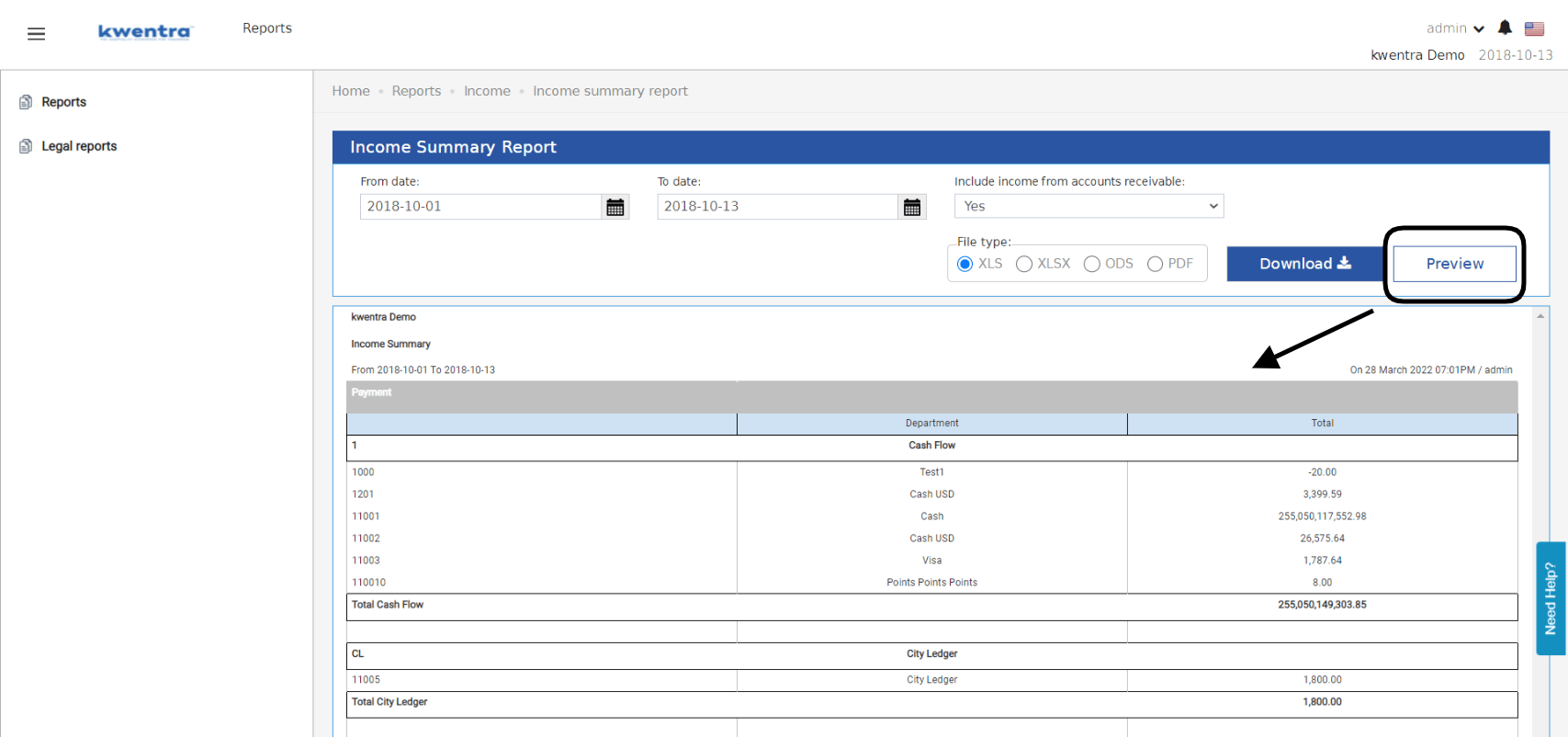
Revenue Sub-Departments New Feature
New Feature: Revenue Entries are now easily dividable on multiple sub-departments to accurately monitor your revenue contribution.Print Multiple Registration Cards At Once
New Feature: you can now print all your Expected Arrivals’ Registration Cards using the new RC Feature from the Actions Button.Search for rooms using the housekeeping block
Feature Update: you can now search for rooms using the housekeeping block they belong to on the room rack.Updates to the room upgrade scenario
Feature Update: using the new , upgrading your guests’ rooms is now a simple task; whether its a free room upgrade or not.Housekeeping State Change Report
New Report: a new housekeeping report that shows the rooms’ status change and its details.Read moreNew Reservation pop up
New Feature: to easily edit and update your reservation details, clicking on the reservation now opens in the same window for quicker edits and updates.Revenue and Occupancy Statistics Report Update
Report Update: updated the revenue and occupancy statistics report to have a better view and inputs.Read moreSearch for multiple room types among your reservations
Feature Update: searching for multiple room types from your individual reservations is now available on the reservations list screen.Search for multiple rooms/room types on room rack
Feature Update: you can now search for a range of room numbers and multiple room types on the room rack to view the rooms you desire.Read moreautomatic population to the market and source fields when selecting a channel
Feature Update: when you are adding a reservation and you select a channel, the market and source fields will automatically update with the data linked to the channel.Housekeeping color codes update to the reservations list screen
Feature Update: all housekeeping status codes are available now on the reservations list screen.Front Office → Individual Reservations