Business Value
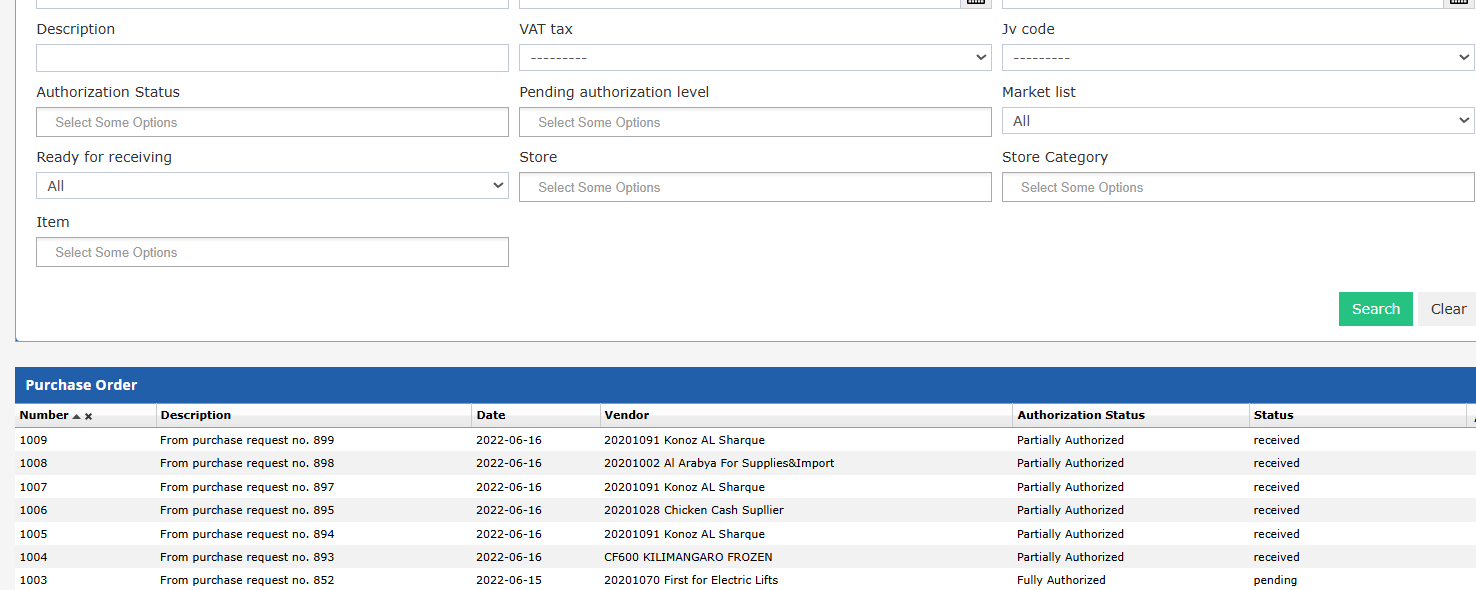
- Allows finance, procurement, and audit teams to instantly identify POs awaiting approval, partially authorized, or fully processed.
- Reduces approval delays by making pending POs visible at a glance.
- Supports compliance and process transparency for all hotel purchases.
Use Cases
- The procurement officer filters all POs still needing authorization to remind department heads.
- The financial controller selects only “Fully Authorized” POs for payment processing and auditing.
- Night audit or compliance reviews quickly locate all POs with incomplete approvals before closing the period.
How-To & Logic
New Filter: Authorization Status
- In the PO list, a new Authorization Status filter is available (autocomplete, multi-select).
- Filter options:
- Pending Authorization: All line items are not fully authorized (not approved or rejected).
- Partially Authorized: Some line items are fully authorized, others are not.
- Fully Authorized: All line items are fully authorized (approved or rejected).
- Items with no authorization workflow are treated as Fully Authorized.
- Closed line items do not affect the authorization status—they are ignored.
- If the PO status is “Closed” (all line items closed), it is always considered Fully Authorized.