

Business Value
- Speeds up processing by approving many receiving orders in one action.
- Reduces repetitive clicks versus handling each order individually.
- Restricts the action to users with the approve permission.
- Confirmation step prevents accidental approvals.
Use Cases
- Cost controller selects a day’s pending receiving orders and approves them all at once.
- Store supervisor without permission never sees the action, keeping control intact.
How It Works
- Select one or more receiving orders in the listing screen.
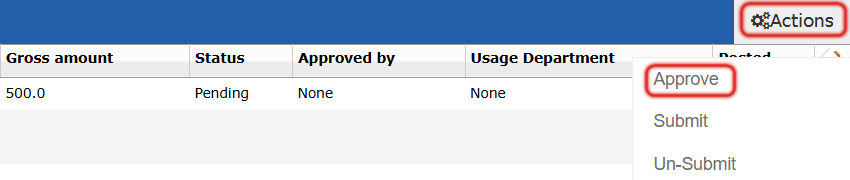
- Open the Actions button at the start of the list and choose Approve.
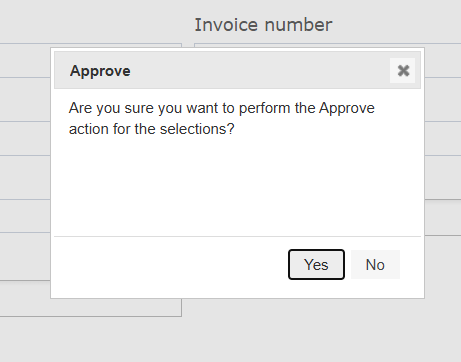
- A confirmation dialog asks “Approve the selected receiving orders?” with Yes and No buttons.
- Yes runs the approve action on the selected receiving orders.
- No dismisses the action with no changes.
Validations
- Bulk Approve applies only to Pending receiving orders.
- The action is hidden for users without permission to approve receiving orders.