

✅ Use Cases:
- When a purchase request is meant for a specific store, and all items should be requested from the same location.
- To avoid accidentally assigning items to the wrong store.
- For centralized control of sourcing in multi-store environments.
New Behavior
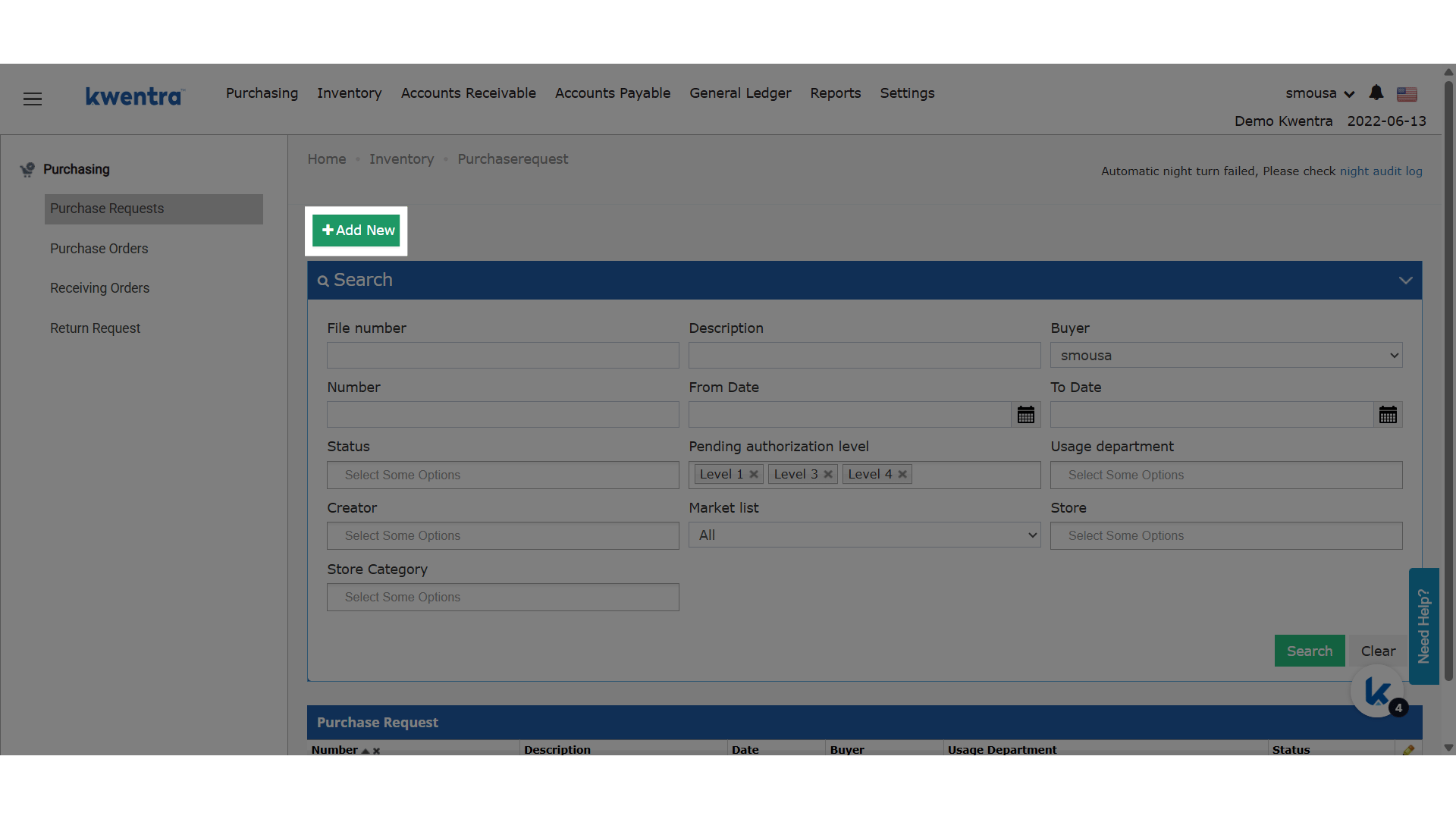
- A new “Store” field is added at the PR header level.
- Once a store is selected:
- It automatically updates all line items to use the selected store.
- It overrides any store that was previously set on any line item.
- A help text appears below the field:
“Selecting a store will apply to all line items below.”
- This behavior matches the one currently available in the “From Store” field in the Store Usage screen.
Update: July 17, 2026
Item Picker Filters by the Applied Store
When you apply a store to all line items, each line’s Item picker now lists only items linked to that store — matching how the per-line Store field already behaves.What’s New?
Previously, applying a store from the header updated every line’s Store field but left the Item picker showing all items, including items not stocked in the selected store. The Item picker now respects the applied store, so buyers pick only items that belong to it.How It Works
- After you select a store on the header, each line’s Item picker lists only items linked to that store.
- Items that are not linked to any store still appear on every line.
- Lines added later, while the header store is still set, follow the same filtering.
- Items already selected on a line are kept as-is — only the list of available choices is narrowed.